Scheduled vs NotionSocial: Which Notion Scheduler Should You Use?
Last updated: February 2026
Reading time: 10 minutes
Both Scheduled and NotionSocial let you publish social media posts directly from Notion. But they take very different approaches, and the right choice depends on what matters most to you.
In this comparison, we break down both tools across features, platforms, pricing, and use cases — so you can make an informed decision.
Quick Overview
| Scheduled | NotionSocial | |
|---|---|---|
| Website | scheduled.so | notionsocial.app |
| Founded | La Réunion, France | India |
| Model | Free trial + paid plans | Freemium |
| Best for | LinkedIn creators, ghostwriters, agencies | Multi-platform publishers |
| Platforms | 6+ (LinkedIn focus) | 9 (broad coverage) |
Platform Support
Scheduled
Scheduled supports LinkedIn (personal profiles + company pages),Instagram (feed, stories, reels, carousels), TikTok, YouTube, YouTube Shorts, Facebook, and Twitter/X.
The tool is built with LinkedIn as its core platform. This means deeper integration, more features, and better reliability for LinkedIn publishing compared to any other Notion scheduler.
NotionSocial
NotionSocial covers LinkedIn, Instagram, Facebook, Twitter/X, Pinterest, TikTok, and YouTube — 9 platforms total. It previously supported Facebook Groups, but this was deprecated following Meta API changes.
NotionSocial has the broader platform coverage of the two. If Pinterest is important for your workflow, it's currently the only Notion scheduler that supports it.
Verdict: NotionSocial wins on platform count (9 vs 6+). Scheduled wins on platform depth, especially for LinkedIn.
LinkedIn Features
This is where the two tools diverge significantly.
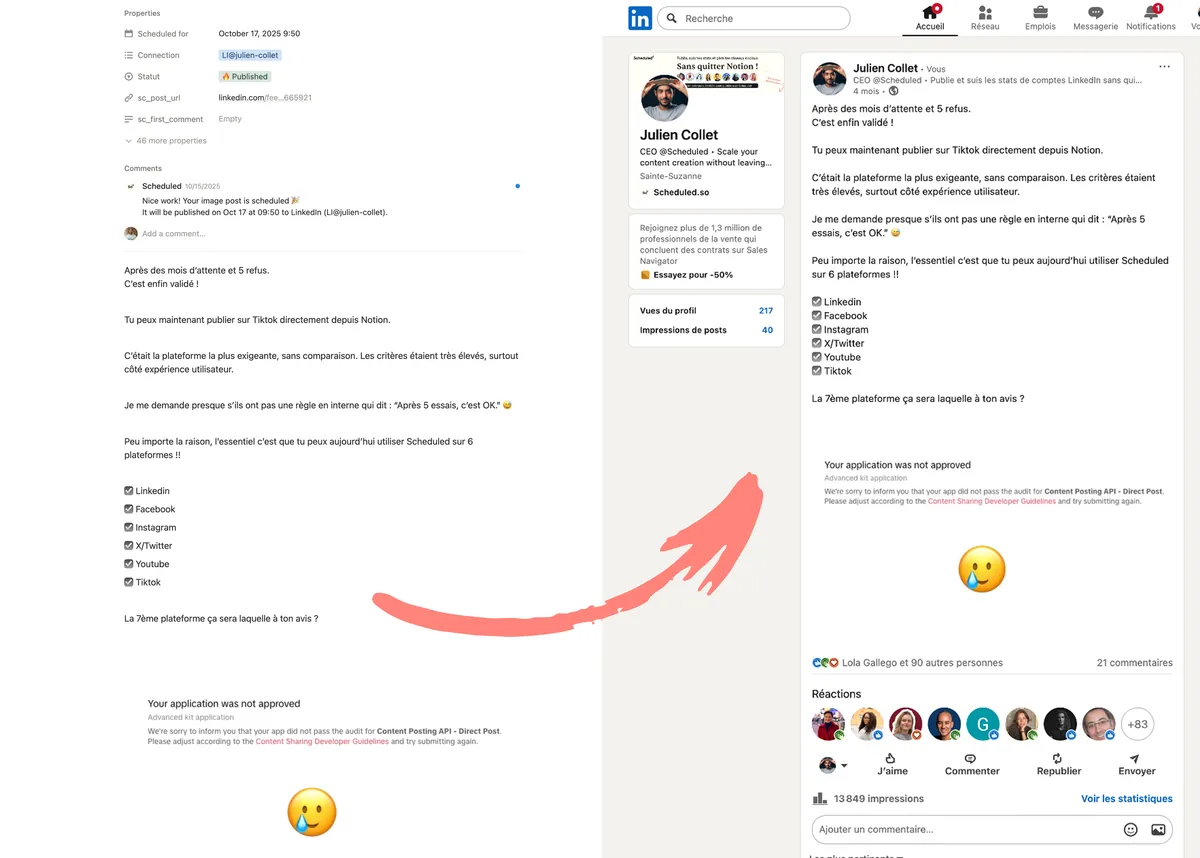
Scheduled: publish to LinkedIn from Notion with bold formatting preserved
Scheduled
- Bold formatting preserved: Text formatted as bold in Notion stays bold on LinkedIn. Hashtags written in Notion become clickable hashtags on LinkedIn.
- Mentions and tags: You can @mention people and company pages on LinkedIn directly from your Notion page. This is a feature no other Notion scheduler offers.
- First comment scheduling: Schedule a comment to be posted immediately after your main post — a proven engagement technique on LinkedIn.
- LinkedIn analytics: Track post performance, follower growth, and engagement metrics from your Scheduled dashboard.
- Company pages: Publish to both personal profiles and LinkedIn company pages.
- Follower statistics: Monitor your follower count over time.
NotionSocial
- Basic LinkedIn post publishing
- Carousel posts on LinkedIn
- No formatting preservation (bold/italic lost)
- No LinkedIn mentions
- No analytics
- No first comment scheduling mentioned in documentation
Verdict: Scheduled dominates for LinkedIn. If LinkedIn is a significant part of your strategy, this comparison isn't close.
Content Creation & Publishing
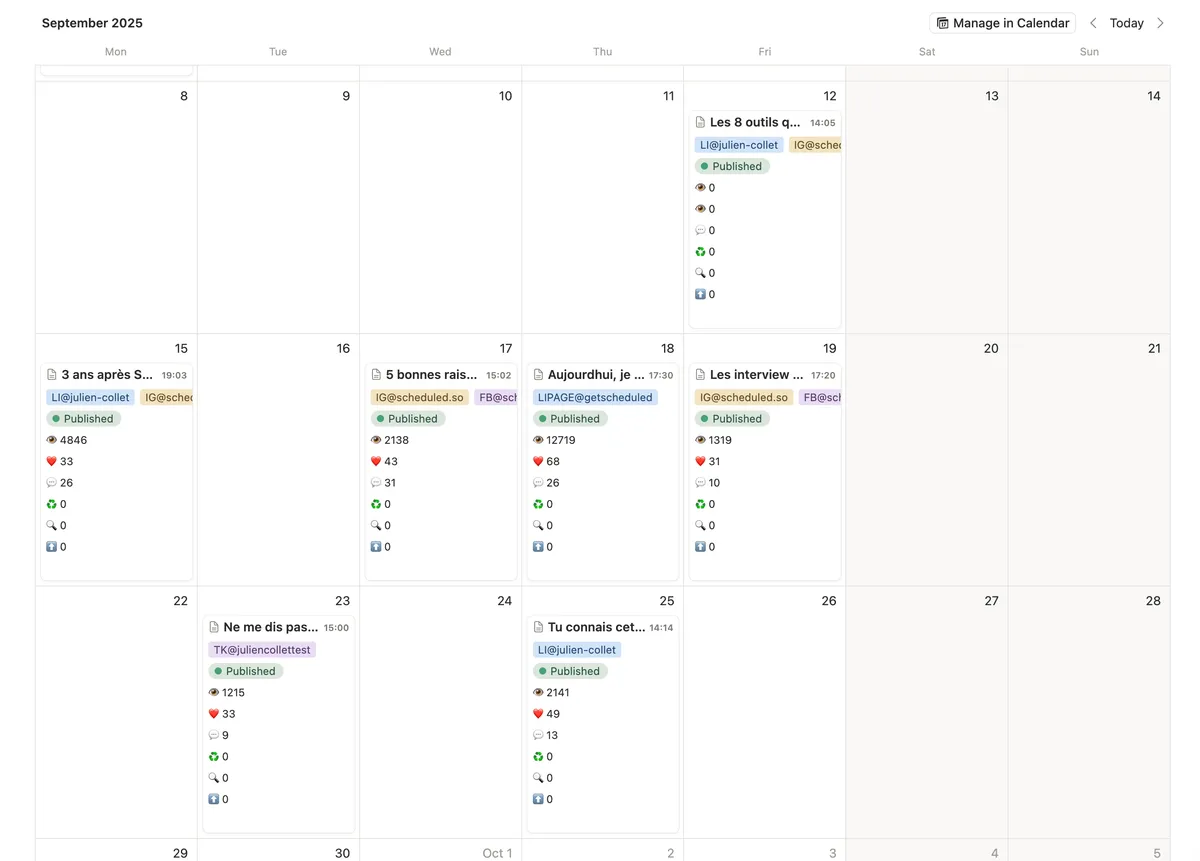
Scheduled: content calendar with built-in statistics
Scheduled
The publishing workflow is straightforward: write your post in a Notion page, select the platform, set the date/time, and change the status to “Scheduled.” Scheduled handles the rest.
Key content features include post preview from Notion, carousel/PDF support for LinkedIn, image and video uploads, and support for multiple media formats across platforms. The tool also provides free Notion templates optimized for content planning.
NotionSocial
NotionSocial uses a plug-and-play approach: it works with any existing Notion database. The tool scans your database every 5 minutes for posts with the right status, then publishes them automatically.
Key content features include carousel posts on Instagram/LinkedIn/Twitter, video support on all platforms, Instagram Reels, and a Chrome extension for previewing posts within Notion.
Verdict: Tie on basic publishing. Scheduled wins on formatting preservation and LinkedIn-specific features. NotionSocial's Chrome preview extension is a nice touch.
Collaboration & Team Features
Scheduled
Scheduled offers purpose-built features for teams:
- Ghostwriter mode: Manage multiple clients' LinkedIn profiles from a single Notion workspace. Write and schedule posts on behalf of your clients without sharing access to their LinkedIn credentials.
- Agency dashboard: Multi-client management with reporting and analytics. Designed for social media agencies handling several accounts.
- Team collaboration: Multiple team members can work on the same Notion workspace, with Notion's native commenting and review features.
NotionSocial
NotionSocial relies on Notion's built-in collaboration features. Multiple people can edit the same database, but there's no dedicated ghostwriter or agency mode. You can connect multiple social accounts, but there's no multi-client management interface.
Verdict: Scheduled wins clearly for teams, ghostwriters, and agencies.
Pricing
Scheduled
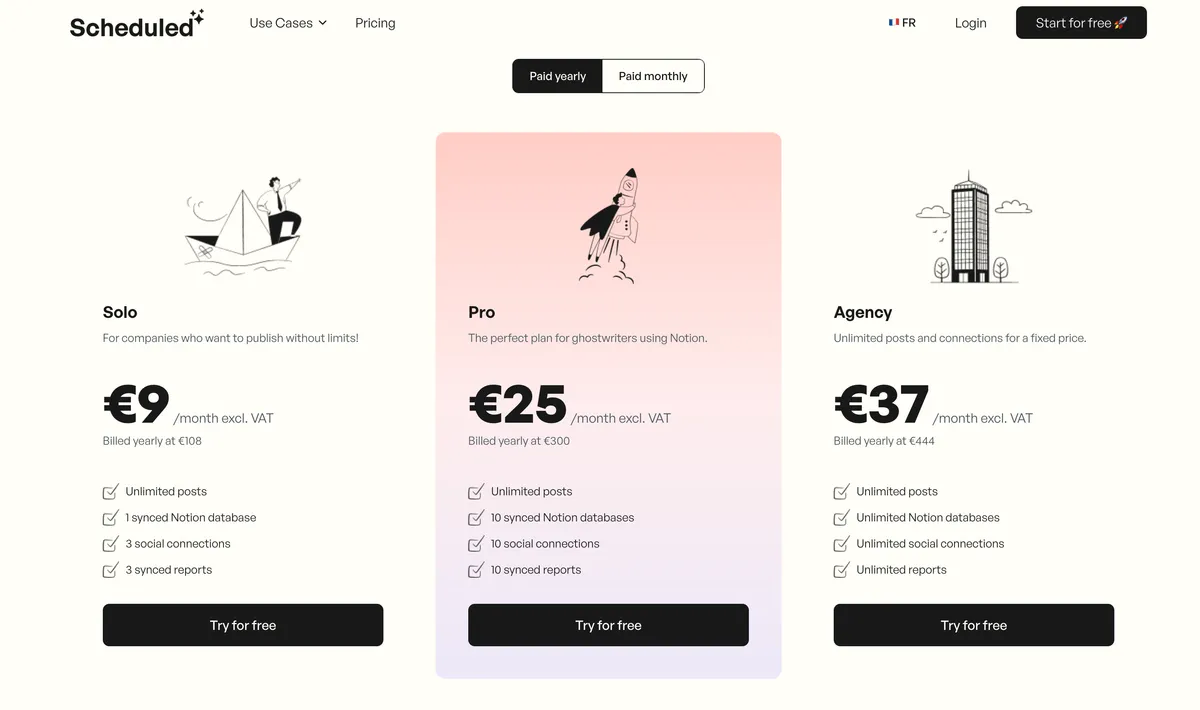
Scheduled pricing (billed annually)
| Plan | Price | What you get |
|---|---|---|
| Free trial | €0 (14 days) | All features to test |
| Solo | €9/mo | Unlimited posts, 3 social connections |
| Pro | €25/mo | 10 social connections, 10 Notion databases |
| Agency | €37/mo | Unlimited connections, full analytics |
Check scheduled.so/pricing for current plans.
NotionSocial

NotionSocial pricing
NotionSocial operates on a freemium model. There is a free tier with limitations and paid plans for additional accounts and features.
Verdict: Scheduled's pricing is transparent, starting at €9/month for the Solo plan.
Setup & Ease of Use
Scheduled
Setup takes about 5 minutes:
- Create an account on scheduled.so
- Connect your Notion workspace
- Connect your social accounts
- Start scheduling
The tool creates an optimized database or connects to your existing one. The interface is clean and straightforward.
NotionSocial
Setup is similarly quick:
- Create an account on notionsocial.app
- Connect your Notion workspace
- Connect your social accounts
- Posts are auto-detected every 5 minutes
NotionSocial's plug-and-play approach means it adapts to any database structure, which is flexible but can sometimes require manual property mapping.
Verdict: Both are quick to set up. Slight edge to Scheduled for guided onboarding and templates.
Support & Reliability
Scheduled
- Support in French and English
- Active development with regular feature releases
- Strong testimonials from LinkedIn professionals and agencies
- Built and maintained by a dedicated founder with a transparent roadmap
- 500+ active clients
NotionSocial
- Support in English only
- Solo developer
- Smaller user base (Chrome extension has 485 users)
- Blog with some documentation, but less comprehensive
Verdict: Scheduled offers better support, especially for French-speaking users.
Feature-by-Feature Comparison
| Feature | Scheduled | NotionSocial |
|---|---|---|
| Platforms supported | 6+ | 9 |
| LinkedIn bold formatting | ✅ | ❌ |
| LinkedIn mentions | ✅ | ❌ |
| LinkedIn analytics | ✅ | ❌ |
| Follower tracking | ✅ | ❌ |
| First comment scheduling | ✅ | ✅ |
| Post preview | ✅ | ✅ (Chrome ext.) |
| Carousel posts | ✅ | ✅ |
| Instagram Reels | ✅ | ✅ |
| Instagram Stories | ✅ | ✅ |
| YouTube Shorts | ✅ | ✅ |
| ❌ | ✅ | |
| Threads | ❌ | ✅ |
| Ghostwriter mode | ✅ | ❌ |
| Agency dashboard | ✅ | ❌ |
| Free Notion templates | ✅ | ❌ |
| French support | ✅ | ❌ |
| Free plan | ✅ | ✅ |
Who Should Use Scheduled?
Scheduled is the right choice if:
- LinkedIn is your primary platform — no other Notion scheduler matches its LinkedIn features
- You're a ghostwriter managing multiple client profiles from Notion
- You run a social media agency and need multi-client dashboards
- Formatting matters to you — bold, hashtags, and mentions need to work
- You want analytics without leaving your workflow
- You speak French and want support in your language
Who Should Use NotionSocial?
NotionSocial is the right choice if:
- You need the widest platform coverage including Pinterest
- LinkedIn formatting isn't critical for your use case
- You want a Chrome preview extension to see post previews in Notion
- You're a solo creator who publishes simple text + image posts across many platforms
Our Recommendation
For the majority of professionals who use Notion to plan their social media content, Scheduled is the stronger choice. The LinkedIn features alone — formatting preservation, mentions, analytics — justify the difference. Add ghostwriter and agency capabilities, French support, and a transparent pricing model, and it's hard to make a case for NotionSocial unless you specifically need Pinterest or prefer the broadest possible platform count.
Both tools offer free plans, so the best approach is to try both and see which one fits your workflow.
Last updated: February 2026. Features and pricing may change. Visit each tool's website for the latest information.