Notion Social Media Planner
Plan, preview, and publish your social media posts - all from Notion. Connect your accounts, schedule content, and track performance without leaving your workspace.
 Free Notion template14-day free trialNo credit card required
Why Notion is the best home for your social media content
Most social media schedulers force you into their interface - a clunky calendar with tiny text boxes, no real workspace. You end up writing content in Notion or Google Docs anyway, then copying it into yet another tool. That's an extra step that wastes time and breaks your flow.
Notion gives you the flexibility to build the exact content planner you need: custom properties for every platform, multiple views (calendar, board, table, gallery), collaborative editing with your team, and a single workspace for everything from ideation to analytics. Whether you're a solo content creator or part of an agency, Notion adapts to your content planning workflow.
The only thing Notion can't do natively is publish. That's where Scheduled comes in. It connects to your Notion database, reads your posts, and publishes them to LinkedIn, Instagram, TikTok, YouTube, Facebook, and X - automatically, on schedule, with formatting preserved.
The result? Your Notion content calendar becomes a full publishing engine. No more copy-pasting, no more switching tools. Notion for content creators finally works end-to-end.
How to build your Notion social media planner
Essential database properties
Write your post content and attach images or videos directly in the body of each Notion page. Then add these properties to organize and schedule your posts:
Account
Select which connected social media account to publish to (LinkedIn, Instagram, TikTok, etc.).
Status
Select property to track drafts, scheduled, published, or needs review.
Publish date
Date property that Scheduled reads to auto-publish at the right time.
Views to organize your content
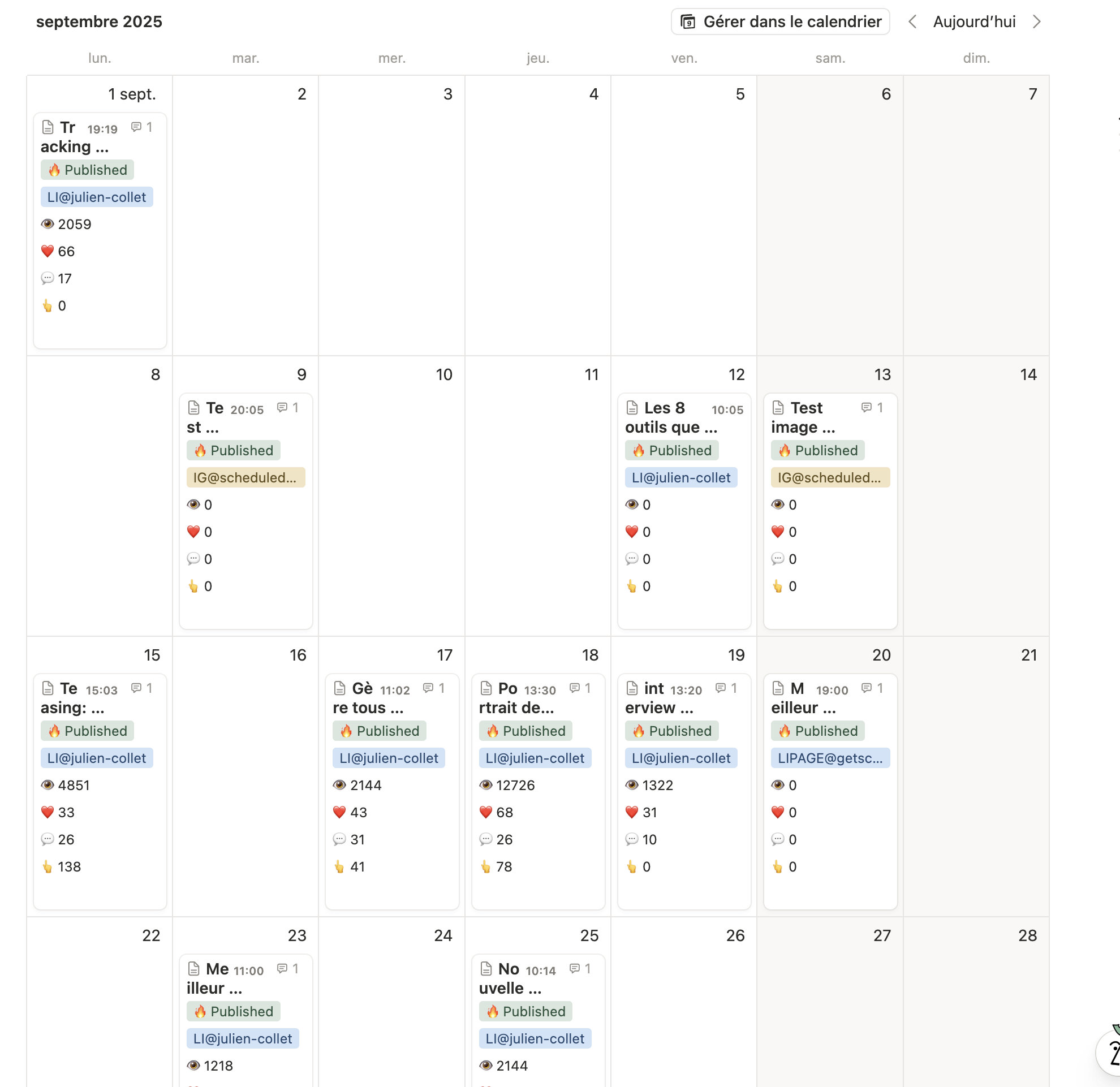
Calendar
See your entire publishing schedule at a glance. Drag and drop posts to reschedule.
Board
Kanban columns by status - move posts from Draft to Scheduled to Published.
Table
Spreadsheet view for bulk editing. Sort and filter by platform, date, or status.
Gallery
Visual grid of your posts with media previews. Perfect for visual content planning.
Don't want to build from scratch?
Get our free Notion social media template - pre-configured with all the right properties, views, and automations. Ready to connect to Scheduled in minutes.
Get the free template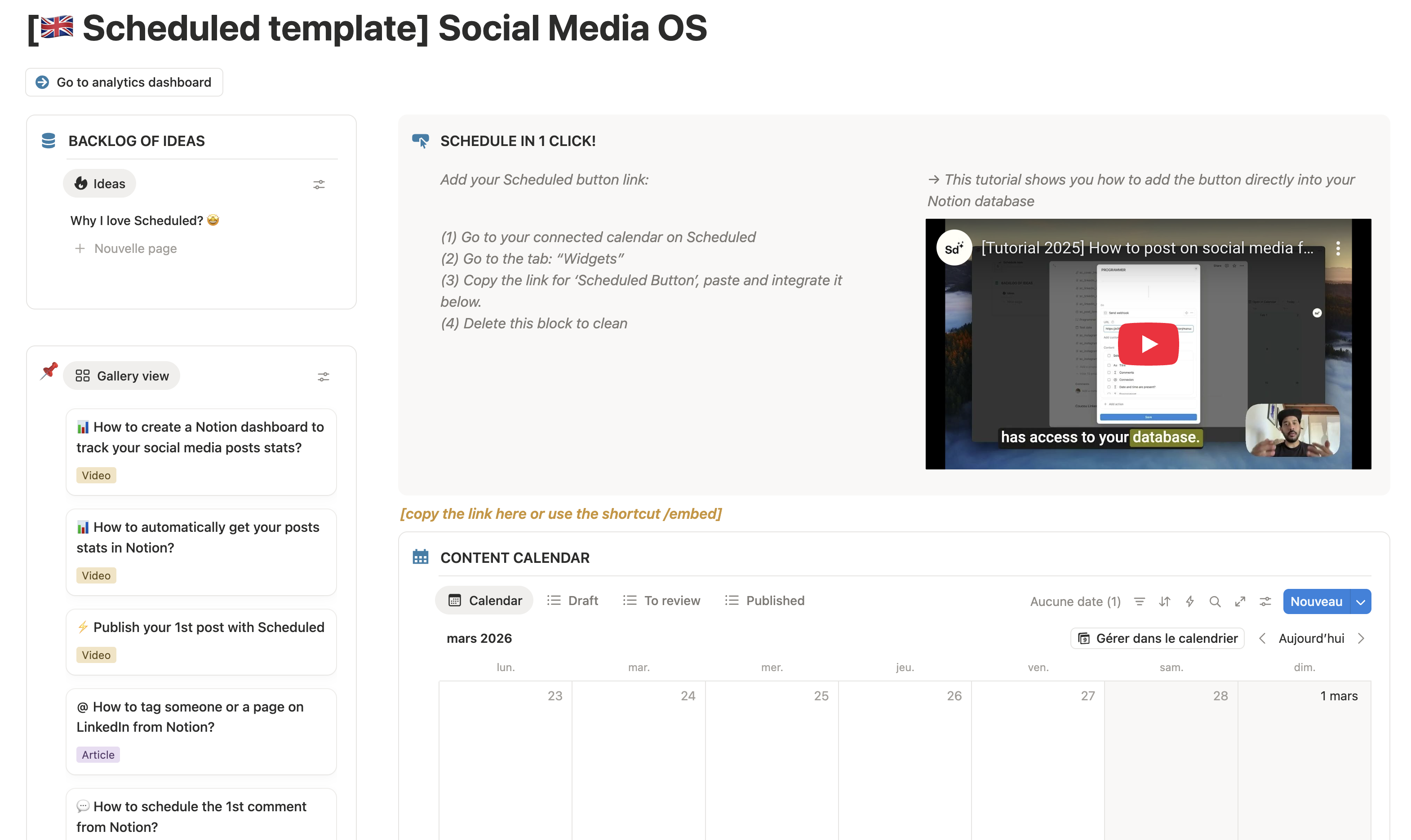
Connect your accounts and start publishing
Sign up for free
Create your Scheduled account - no credit card required, 14-day free trial included.
Select your Notion database
Connect Notion and pick the database you want to use as your content planner.
Map your properties
Tell Scheduled which Notion properties correspond to account, status, and publish date.
Connect your social accounts
Link your LinkedIn, Instagram, TikTok, YouTube, Facebook, or X profiles.
Start publishing
Schedule posts from Notion and let Scheduled publish them automatically.
Who uses Notion as a social media planner?
Solo creators
Plan a week of content in one sitting. Write in Notion, schedule with Scheduled, and get back to creating.
Ghostwriters
Manage multiple client profiles from a single Notion workspace. Unlimited accounts, one fixed price.
Agencies
Collaborate with your team in Notion, get client approval, and publish - all without leaving your workspace.
Community managers
Juggle multiple platforms and accounts? Notion becomes your single source of truth for every post.
What makes Scheduled different
6 platforms supported
Publish to LinkedIn, Instagram, TikTok, YouTube, Facebook, and X - all from one Notion database.
LinkedIn formatting preserved
Bold, italic, lists, and emojis render exactly as you wrote them in Notion. No copy-paste reformatting.
Mentions & tags
Tag LinkedIn profiles and company pages directly from Notion using hyperlinks.
First comment scheduling
Schedule a first comment to publish automatically with your post - great for engagement and links.
Analytics in Notion
Sync post impressions, likes, comments, and shares back to your Notion database automatically.
Follower tracking
Monitor follower growth across all connected accounts with daily-updated reports.
Post preview
See exactly how your post will look on each platform before publishing. Catch formatting issues early.
Cross-platform publishing
Publish to multiple platforms from a single Notion card. Write once, distribute everywhere.
Secure client access
Invite clients to connect their own profiles - no need to share passwords. Publish on their behalf securely.
Simple, transparent pricing
Starting at €9/mo. 14-day free trial. No credit card required.
All plans include unlimited posts, formatting preservation, and analytics.
See pricing →Frequently asked questions
Yes. Scheduled connects to any Notion database. You just map your existing properties (content, date, status, etc.) to Scheduled's fields. No need to start from scratch.
Scheduled supports LinkedIn (profiles and pages), Instagram (business and creator accounts), TikTok, YouTube (community posts and Shorts), Facebook (pages), and X (Twitter).
Yes. When you sign up, you can use your own Notion database or download our free template pre-configured with all the properties you need for social media planning.
Set a publish date in your Notion database and change the status to 'Scheduled'. Scheduled reads your database and publishes the post at the specified date and time automatically.
Yes. On the Pro and Agency plans you can connect multiple accounts across all supported platforms. Ghostwriters and agencies can manage unlimited client profiles.
Yes. Bold, italic, bullet lists, numbered lists, and emojis in your Notion content are preserved exactly when published to LinkedIn. No more formatting lost in copy-paste.
Scheduled starts at €9/month for the Solo plan. There's a 14-day free trial with no credit card required. See the pricing page for full details on Pro and Agency plans.